
US IPOs (Initial Public Offerings)
This guide provides a comprehensive reference for integrating U.S. IPOs into your platform.
Overview of US IPOs
Alpaca offers access to a broad range of US IPO offerings, allowing partners to buy shares at the IPO listing, before the stock becomes available on the secondary market.
The IPO API provides:
- Read-only discovery of IPO offerings
- Order placement and management via the existing Broker API
- Real-time offering updates via Server-Sent Events (SSE)
Order Management
US IPOs only accept notional (dollar amount) GTC orders. End-users are able to place one conditional order to buy (COBs) per IPO offering, once it becomes available in the API. This order can be modified/canceled until the 60 minute window ends.
Fractional shares are not supported for IPOs.
Sample IPO Timeline
Below is an example of an IPO timeline. Please note that not all IPOs follow this timeline and they’re always subject to change.
| Step | Event | Description | Date & Time (ET) |
|---|---|---|---|
| 1 | Order Entry Window Opens | Investors begin submitting Conditional Offers to Buy (COBs). | Monday, June 9 at 9:00 AM |
| 2 | 60-Minute Notice Sent | Final withdrawal/modification window before pricing. COBs become binding after this. | Wednesday, June 11 at 3:00 PM |
| 3 | Allocation Engine Runs | Allocation algorithm executed based on demand and allocation. | Thursday, June 12 at 7:01 AM |
| 4 | Alpaca sends allocations to partner | Allocation info sent to partner via API | Thursday, June 12 at 7:30 AM |
| 5 | IPO Date | Stock starts trading on listing exchange | Thursday, June 12 at 11:00 AM |
| 6 | Allocations Settled | Shares delivered via DTC to partner clearing accounts (T+1) | Friday, June 13 |
Authentication
Authentication uses the same Alpaca OAuth 2.0 bearer token used for Broker API. No changes are required.
Example header:
Authorization: Bearer <token>| Response Code | Description |
|---|---|
401 Unauthorized | Missing, invalid, or expired token |
403 Forbidden | Valid token without sufficient scope |
For more information, see Authentication.
Attributes
| Attribute | Type | Notes |
|---|---|---|
| name | string | The official name of the offering. |
| description | string | A longer human-readable description of the offering, when available. |
| ticker_symbol | string | The ticker symbol that will be used once the security begins trading on the secondary market. |
| ipo_reference | string | The unique offering identifier used across the IPO Events Stream and /v1/ipos/{ipo_reference}. Also the path parameter on the get-one endpoint. Treat as opaque — format varies (e.g. FDXF, 333290518, BBWRLH2QEC); do not parse. |
| cusip_id | string | CUSIP identifier of the offering. Standard CUSIPs are 9 alphanumeric characters; sandbox may use synthetic test values. |
| prospectus_url | string | URL to the prospectus document. Mirrors the prospectus_url payload of the corresponding Prospectus event on the IPO Events Stream. |
| offering_type | string | The type of offering. Currently always IPO. |
| availability | string enum | Whether the offering is currently accepting orders. One of available (open for orders), not_available (not yet open), or closed (terminal — no further orders accepted). |
| anticipated_shares | integer | Anticipated total share count for the offering, when known. |
| max_price | string (decimal) | Upper bound of the indicated price range. Decimal string with no fixed precision (e.g. "25" or "25.50"). |
| min_price | string (decimal) | Lower bound of the indicated price range. Decimal string with no fixed precision (e.g. "20" or "20.50"). |
| trade_date | string (date) | Anticipated first trading date on the secondary market, in YYYY-MM-DD format. |
| settlement_date | string (date) | Anticipated settlement date, in YYYY-MM-DD format. |
| no_new_orders | boolean | When true, the offering is in its 60-minute withdrawal window and is not accepting new orders. This mirrors the SixtyMinMail event on the IPO Events Stream. |
| sixty_minute_expiration_time | string (RFC3339) | Optional. When the 60-minute withdrawal window has started for this offering, this is the RFC3339 timestamp at which the window expires (e.g. "2026-05-19T20:00:01Z"). Absent on offerings whose 60-minute window has not started. Note: this field is only the expiration of the window — to know when the window opens, subscribe to the SixtyMinMail event on the IPO Events Stream. The field is intended to drive UI countdowns once you have been notified via SSE. |
| underwriters | array of strings | List of underwriter names participating in the offering. |
| unit_step_size | string (decimal) | Optional. The minimum increment in which order amounts (notional) can be specified. Only present on offerings that enforce a step-size constraint; absent when there is no step-size constraint. |
| min_ticket_size | string (decimal) | Minimum allowed order amount. Decimal string with no fixed precision. |
| max_ticket_size | string (decimal) | Maximum allowed order amount. Decimal string with no fixed precision. |
Endpoints
List IPO Offerings
GET /v1/ipos
Retrieves a paginated list of IPO offerings.
Note on the offerings:
Two offerings can share the same
ticker_symbolbut have a differentipo_reference,availability. This can happen if an issuer lists a deal then cancels or postpones it and enough time passes, where financials change, they make changes to prospectus, etc. In this case, the IPO reference will be different but the symbol will still be the same.
Parameters
| Parameter | Type | Description | Notes |
|---|---|---|---|
availability | string | IPO availability status | not_available, available, closed |
ticker | string | Filter by stock ticker | e.g., EXMP, ACME |
limit | integer | Number of results per page | Default: 50, Max: 200 |
page_token | string | Token for pagination | Used to fetch the next page |
Example Request
curl -s -H "Authorization: Bearer $TOKEN" \
  "https://broker-api.alpaca.markets/v1/ipos?availability=available&limit=50"
Example Response (200)
{
  "data": [
    {
      "name": "Example Corp",
      "description": "Example business description",
      "ticker_symbol": "EXMP",
      "ipo_reference": "EXMP260615",
      "cusip_id": "123456789",
      "prospectus_url": "https://example.com/prospectus.pdf",
      "offering_type": "IPO",
      "availability": "available",
      "anticipated_shares": 1000000,
      "max_price": "25",
      "min_price": "20",
      "trade_date": "2026-06-15",
      "settlement_date": "2026-06-16",
      "no_new_orders": false,
      "underwriters": ["Bank A", "Bank B"],
      "min_ticket_size": "100",
      "max_ticket_size": "10000"
    }
  ],
  "next_page_token": null
}
Notes on the example:
unit_step_sizeis omitted because this offering does not enforce a step-size constraint.sixty_minute_expiration_timeis absent because the 60-minute withdrawal window has not started yet.- Numeric fields (
min_price,max_price,min_ticket_size, etc.) are decimal strings with no fixed precision — do not assume two-decimal formatting.ipo_referenceis opaque; do not parse or assume a specific shape.
Get IPO by ID
GET /v1/ipos/{ipo_reference}
Retrieves a single IPO offering by its reference ID.
Example Request
curl -s -H "Authorization: Bearer $TOKEN" \
  "https://broker-api.alpaca.markets/v1/ipos/EXMP260615"
Example Response (200)
{
  "data": {
    "name": "Example Corp",
    "description": "Example business description",
    "ticker_symbol": "EXMP",
    "ipo_reference": "EXMP260615",
    "cusip_id": "123456789",
    "prospectus_url": "https://example.com/prospectus.pdf",
    "offering_type": "IPO",
    "availability": "available",
    "anticipated_shares": 1000000,
    "max_price": "25",
    "min_price": "20",
    "trade_date": "2026-06-15",
    "settlement_date": "2026-06-16",
    "no_new_orders": true,
    "sixty_minute_expiration_time": "2026-06-15T13:00:00Z",
    "underwriters": ["Bank A", "Bank B"],
    "unit_step_size": "1",
    "min_ticket_size": "100",
    "max_ticket_size": "10000"
  }
}
This example is for an offering inside its 60-minute withdrawal window — note
no_new_orders: trueand the populatedsixty_minute_expiration_time.
Placing IPO Orders
IPO orders are placed using the standard Broker API order endpoints. Order requests and responses use the standard Order schema — see the Create Order for Account reference for the complete request and response field set. The fields below are the IPO-specific points of attention.
Omnibus & Omnisub partners will have to place multiple orders for the same offering. A new order will have to be placed for every end-user order on an IPO offering. No bulk orders/aggregation of orders will be supported.
IPO-specific order rules
- Use the
ipo_reference(offering reference) as thesymbolfield in order requests. - IPO orders are notional-only: provide
notional; omitqty. On responses,qtywill always benullfor IPO orders. - Only
side=buyis accepted for IPOs. typemust bemarket.time_in_forcemust begtc— effective only during the offering period and the 60-minute withdrawal window.- Orders are validated against offering constraints (
min_ticket_size,max_ticket_size, andunit_step_sizewhen present). asset_classon responses is"ipo".
Place an IPO Order
POST /v1/trading/accounts/{account_id}/orders
New orders can only be placed while the offering is availability=available and before the 60-minute withdrawal window starts (no_new_orders=false). Orders submitted after the 60-minute window has started may be accepted synchronously and rejected later via the trade events SSE stream — see Error Handling for details.
Example Request
curl -s -X POST \
  -H "Authorization: Bearer $TOKEN" \
  -H "Content-Type: application/json" \
  "https://broker-api.alpaca.markets/v1/trading/accounts/{account_id}/orders" \
  -d '{
    "symbol": "EXMP260615",
    "side": "buy",
    "type": "market",
    "time_in_force": "gtc",
    "notional": "1000",
    "client_order_id": "my-unique-order-123"
  }'
Example Response (200)
The response is a standard Order object. The IPO-specific fields to focus on:
{
  "id": "b50c01d4-3d71-4295-8426-93c953c1ceb6",
  "client_order_id": "my-unique-order-123",
  "status": "new",
  "asset_class": "ipo",
  "symbol": "EXMP260615",
  "notional": "1000",
  "qty": null,
  "side": "buy",
  "type": "market",
  "time_in_force": "gtc",
  "created_at": "2026-06-09T15:30:00.000Z",
  "submitted_at": "2026-06-09T15:30:00.000Z"
}
The full response also includes the standard Order fields (updated_at, filled_at, filled_qty, filled_avg_price, expired_at, canceled_at, failed_at, replaced_at, replaced_by, replaces, asset_id, order_class, order_type, position_intent, limit_price, stop_price, extended_hours, legs, trail_percent, trail_price, hwm, subtag, source). See the Create Order for Account reference for the canonical schema.
Replace an IPO Order
PATCH /v1/trading/accounts/{account_id}/orders/{order_id}
See the Replace Order for Account reference for the full schema. For IPO orders, only notional and client_order_id are meaningful in the request body. Modifications are accepted throughout the offering period and the 60-minute withdrawal window — once the withdrawal window ends, the COB becomes binding and modifications are no longer permitted.
Example Request
curl -s -X PATCH \
  -H "Authorization: Bearer $TOKEN" \
  -H "Content-Type: application/json" \
  "https://broker-api.alpaca.markets/v1/trading/accounts/{account_id}/orders/{order_id}" \
  -d '{
    "notional": "1500"
  }'
Rejection after the modification window closes
Replace requests submitted after the modification window has closed are currently accepted synchronously (HTTP 200) and rejected later via the trade events SSE stream — see Asynchronous rejections. The trade event arrives as a rejected event whose inner order.reason references the closed modification window. Subscribe to the trade events stream to surface this terminal status to end-users.
Cancel an IPO Order
DELETE /v1/trading/accounts/{account_id}/orders/{order_id}
See the Delete Order for Account reference. Cancellation is accepted throughout the offering period and the 60-minute withdrawal window — once the withdrawal window ends, the COB becomes binding and cancellation is no longer permitted.
Example Request
curl -s -X DELETE \
  -H "Authorization: Bearer $TOKEN" \
  "https://broker-api.alpaca.markets/v1/trading/accounts/{account_id}/orders/{order_id}"
Get IPO Order
GET /v1/trading/accounts/{account_id}/orders/{order_id}
Retrieve the current status of an IPO order. Returns the standard Order schema — see Get Order for Account.
Example Request
curl -s -H "Authorization: Bearer $TOKEN" \
  "https://broker-api.alpaca.markets/v1/trading/accounts/{account_id}/orders/{order_id}"
Example Response (200)
IPO-specific fields shown below; the full response includes all standard Order fields.
{
  "id": "b50c01d4-3d71-4295-8426-93c953c1ceb6",
  "client_order_id": "my-unique-order-123",
  "status": "new",
  "asset_class": "ipo",
  "symbol": "EXMP260615",
  "notional": "1000",
  "qty": null,
  "filled_qty": "0",
  "filled_avg_price": null,
  "side": "buy",
  "type": "market",
  "time_in_force": "gtc",
  "created_at": "2026-06-09T15:30:00.000Z",
  "submitted_at": "2026-06-09T15:30:00.000Z",
  "filled_at": null
}
List IPO Orders
GET /v1/trading/accounts/{account_id}/orders
List orders for an account, optionally filtered by IPO symbol. Uses the standard List Orders for Account endpoint and parameter set.
Parameters
| Parameter | Type | Description |
|---|---|---|
symbols | string | Filter by IPO symbol (ipo_reference) |
status | string | Filter by order status |
limit | integer | Number of results (default: 50, max: 500) |
Example Request
curl -s -H "Authorization: Bearer $TOKEN" \
  "https://broker-api.alpaca.markets/v1/trading/accounts/{account_id}/orders?symbols=EXMP260615"
Order Status Flow
IPO orders follow a specific lifecycle:
| Status | Description |
|---|---|
pending_new | Order submitted, awaiting acknowledgment (transient) |
new | Order accepted, awaiting allocation |
filled | Shares allocated at final price |
canceled | Order canceled during withdrawal window |
rejected | Order rejected (constraints not met, offering closed, etc.) |
replaced | Order replaced |
Typical flow:
- Order placed →
pending_new(briefly) - Acceptance →
new - Allocation received →
filled(withfilled_qtyandfilled_avg_pricepopulated)
Note: Available 24/7, so orders transition from pending_new to new immediately upon acceptance. Orders remain in new status until the offering closes and allocations are distributed. The pending_new status is transient and should resolve within seconds.
Important: The statuses held, accepted, pending_cancel, and pending_replace are not part of the standard IPO order lifecycle. If you observe these statuses persisting, it may indicate an issue.
Asynchronous rejections
Some rejection conditions are not evaluated synchronously at submission time and are instead delivered later as a rejected event on the trade events SSE stream (GET /v2/events/trades). The most common cases are:
- Submitting a new order against an offering that has entered its 60-minute withdrawal window (
no_new_orders=true) — the order is accepted aspending_newand rejected asynchronously. - Replacing or cancelling an order after the modification window has closed — the request is accepted synchronously and rejected asynchronously.
- Account-level eligibility checks that fail post-acceptance.
- Allocation-time rejections (e.g. duplicate orders, allocation engine constraints).
Always subscribe to the trade events stream alongside the IPO events stream to surface these terminal status changes to end-users.
IPO Positions
Once an IPO is allocated to an end-user, it appears as a position on the standard positions endpoints with asset_class: "us_equity". See the Positions API reference for the full schema.
Lifecycle
There are three lifecycle states relevant to position visibility:
- Before allocation. While the order is still in
new/pending_new, no position row exists — there is no fill yet. - Post-allocation, pre-secondary-listing. Once the allocation is delivered, a position row appears with
qty,qty_available,avg_entry_price, andcost_basispopulated from the allocation. Market-data-derived fields are unavailable in this window because the security has not started trading on the secondary market yet — see below. - Once secondary trading starts. The pricer feed for the security activates; market-data fields populate normally on subsequent reads.
Market-data fields during the pre-listing window
While the position is in the post-allocation, pre-secondary-listing window, the following fields are returned as null:
market_valueunrealized_pl,unrealized_plpcunrealized_intraday_pl,unrealized_intraday_plpccurrent_price,lastday_price,change_todayexchangeis returned as an empty string
The fields populated in this window are:
asset_class: "ipo"symbol(theipo_reference)qty,qty_available(the allocated share count)avg_entry_price,cost_basis(derived from the final allocation price)side
Recommendation: when rendering an allocated-but-not-yet-listed IPO position, fall back to avg_entry_price for any UI cell that would normally show a current price, and treat unrealized P&L as zero until secondary trading begins.
Example Response (200) — pre-listing IPO position
{
  "asset_id": "0a1b2c3d-4e5f-6789-abcd-ef0123456789",
  "symbol": "EXMP260615",
  "exchange": "",
  "asset_class": "ipo",
  "qty": "100",
  "qty_available": "100",
  "side": "long",
  "avg_entry_price": "20",
  "cost_basis": "2000",
  "market_value": null,
  "current_price": null,
  "lastday_price": null,
  "change_today": null,
  "unrealized_pl": null,
  "unrealized_plpc": null,
  "unrealized_intraday_pl": null,
  "unrealized_intraday_plpc": null
}
Server-Sent Events (SSE)
GET /v2/events/ipos
Stream real-time IPO updates including offering changes, availability updates, allocations, and timeline milestones.
Query Parameters
| Parameter | Type | Description |
|---|---|---|
since | string (date) | Optional. Replay historical events from this date forward (YYYY-MM-DD). When omitted, the stream only delivers new events from the moment of connection. Use this for reconnect / replay. |
Event Types
| Event | Description | Visibility |
|---|---|---|
Offering | New IPO offering created | Broadcast |
OfferingUpdate | Offering details changed | Broadcast |
OfferingCancellation | Offering cancelled | Broadcast |
Prospectus | Prospectus URL updated | Broadcast |
SixtyMinMail | 60-minute withdrawal window started | Broadcast |
Allocation | Shares allocated to user | Per-account |
Note on verb casing:
verbvalues are PascalCase (e.g.Offering,SixtyMinMail). Match exactly when filtering events.
Visibility:
- Broadcast events are sent to all connected clients.
- Per-account events are filtered to the specific account that received the allocation.
Sandbox limitation:
Prospectusevents are not currently emitted in the sandbox environment. Test theProspectushandler in production.
Event Schema
All events follow a common envelope structure:
{
  "verb": "Offering",
  "offering_reference": "EXMP260615",
  "event_id": "01JBPXJ4Z8XWQK3QY2Q5N9R8KT",
  "payload": {},
  "at": "2026-06-09T10:30:00.000Z",
  "received_at": "2026-06-09T10:30:00.000Z"
}| Field | Type | Description |
|---|---|---|
verb | string | Event type identifier (PascalCase — see Event Types above). |
offering_reference | string | Unique IPO offering ID. Treat as opaque. |
event_id | string (ULID) | ULID identifying this event uniquely. Useful for de-duplication when reconnecting with since=. |
payload | object | absent | Event-specific data. Optional — OfferingCancellation events do not include a payload. |
at | string (RFC3339) | Source timestamp from the upstream IPO system. |
received_at | string (RFC3339) | Timestamp when Alpaca received and broadcast the event. Typically very close to at. |
Allocation Events
Allocation events include additional account-specific fields at the top level (alongside the envelope):
{
  "verb": "Allocation",
  "offering_reference": "EXMP260615",
  "event_id": "01JBPXJ4Z8XWQK3QY2Q5N9R8KT",
  "account_number": "511768662",
  "correspondent": "LPCA",
  "payload": {
    "cusip_id": "123456789",
    "final_price": "20",
    "allocated_shares": "100",
    "allocated_amount": "2000",
    "subject": "IPO Allocation: Example Corp"
  },
  "at": "2026-06-12T07:30:00.000Z",
  "received_at": "2026-06-12T07:30:00.000Z"
}| Field | Type | Description |
|---|---|---|
account_number | string | Alpaca account number |
correspondent | string | Broker correspondent code (e.g., LPCA) |
Example Request
# Live tail
curl -N \
  -H "Accept: text/event-stream" \
  -H "Authorization: Bearer $TOKEN" \
  "https://broker-api.alpaca.markets/v2/events/ipos"

# Replay events from a given date forward
curl -N \
  -H "Accept: text/event-stream" \
  -H "Authorization: Bearer $TOKEN" \
  "https://broker-api.alpaca.markets/v2/events/ipos?since=2026-06-01"
Example Event Payloads
Offering created:
data: {"verb":"Offering","offering_reference":"EXMP260615","event_id":"01JBPXJ4Z8XWQK3QY2Q5N9R8KT","payload":{"name":"Example Corp","ticker_symbol":"EXMP","offering_type_name":"IPO","available_to_order":"Available","min_price":"18","max_price":"22","source":"sync-offerings"},"at":"2026-06-09T10:30:00.000Z","received_at":"2026-06-09T10:30:00.000Z"}
payload.available_to_orderis emitted as a PascalCase enum string — one of"Available","NotAvailable", or"Closed". Note this is not the same value space as the offering object'savailabilityfield, which is lowercase (available/not_available/closed). When mapping between the two, normalize on the client side.payload.sourceidentifies the upstream sync source (e.g."sync-offerings"). Treat as informational.
Sixty-Minute Mail:
data: {"verb":"SixtyMinMail","offering_reference":"EXMP260615","event_id":"01JBPXJ4Z8XWQK3QY2Q5N9R8KT","payload":{"subject":"60-minute withdrawal window: Example Corp","sixty_minute_expiration_time":"2026-06-15 13:00:02 UTC"},"at":"2026-06-15T12:00:02.000Z","received_at":"2026-06-15T12:00:02.000Z"}
payload.sixty_minute_expiration_timeis a free-form string in the formYYYY-MM-DD HH:MM:SS UTC— not RFC3339, and not the same format as thesixty_minute_expiration_timeattribute on the offering object (which is RFC3339). Parse against the explicitYYYY-MM-DD HH:MM:SS UTClayout when reading from the SSE payload.
Offering cancellation:
data: {"verb":"OfferingCancellation","offering_reference":"EXMP260615","event_id":"01JBPXJ4Z8XWQK3QY2Q5N9R8KT","at":"2026-06-09T11:00:00.000Z","received_at":"2026-06-09T11:00:00.000Z"}
OfferingCancellationevents do not include apayload. Treat the absence as an empty body.
Allocation:
data: {"verb":"Allocation","offering_reference":"EXMP260615","event_id":"01JBPXJ4Z8XWQK3QY2Q5N9R8KT","account_number":"511768662","correspondent":"LPCA","payload":{"final_price":"20","allocated_shares":"100","allocated_amount":"2000"},"at":"2026-06-12T07:30:00.000Z","received_at":"2026-06-12T07:30:00.000Z"}IPO Lifecycle
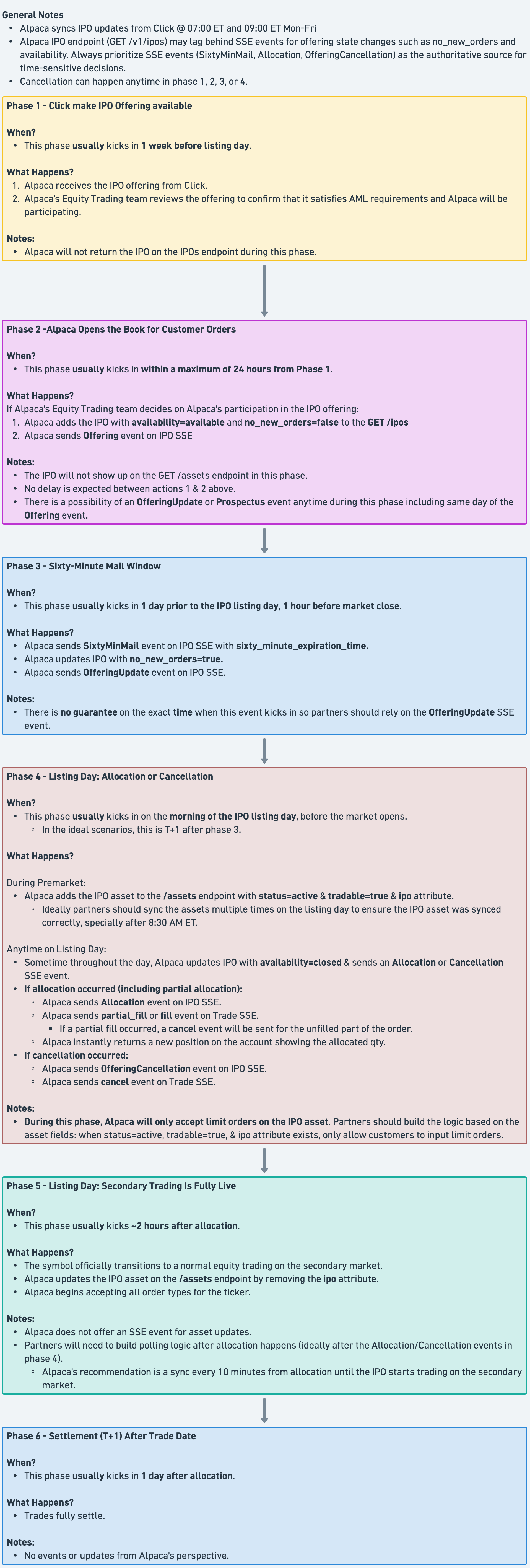
Response Headers
| Header | Value | Description |
|---|---|---|
Content-Type | text/event-stream | |
Cache-Control | no-cache | |
Connection | keep-alive | |
X-Ratelimit-Limit | 20 | Maximum concurrent SSE consumers per access token. |
Notes
- Reconnect on connection drops: re-issue the request with
since=<last-received-date>to replay events you may have missed during the disconnect, then de-duplicate usingevent_id. - Browser note: Native
EventSourcedoes not support setting headers; use a polyfill or fetch-based SSE shim that allows passing theAuthorizationheader.
The SixtyMinMail Event
SixtyMinMail EventThis event signals the start of the 60-minute COB (Conditional Order to Buy) withdrawal/cancellation final window on the effective date:
- Investors can cancel or modify orders during this window.
- New orders cannot be placed after the 60-minute window has started.
- After the window ends, the COB becomes binding.
- Consider sending an additional email notification to the end-user for auditability.
Driving a UI countdown: the offering object exposes
sixty_minute_expiration_time(RFC3339) once the window has started — use theSixtyMinMailSSE event as the trigger to enter the countdown UI, then read the offering'ssixty_minute_expiration_time(or the SSE payload'ssixty_minute_expiration_time) for the deadline. The expiration field on the offering object alone cannot be used as a start signal because by the time it appears, the window has already begun.
Pagination
- Use
limitandpage_tokenon list endpoints - On 200 responses,
next_page_tokenis returned if more results are available - Pass
next_page_tokenaspage_tokenin subsequent requests
Error Handling
Where errors come from
- API response (synchronous) — The server returns an HTTP error status and a JSON body with
codeandmessage. - Trade events (SSE, asynchronous) — After an order is accepted, it may later be rejected. That rejection is delivered on the account's trade events stream (
GET /v2/events/trades) — see Asynchronous rejections above.
REST API
On error the API returns:
- HTTP status: 400, 401, 403, 404, 422, 429, 500, 501, 503, 504
- JSON body:
code(number),message(string)
Example:
{ "code": 40020012, "message": "IPO orders must specify notional and omit qty" }General error codes (all APIs, including IPO)
The same error codes and HTTP statuses that apply to all Alpaca API endpoints also apply to IPO endpoints. See the main API documentation for the full list.
IPO-specific error codes
IPO order create and replace can return the following. HTTP status varies (400, 404, 422, 500, 501, 429, 503, 504).
| HTTP Status Code | Error Code | Error Message |
|---|---|---|
| 400 | 40010000 | request body format is invalid |
| 422 | 40020010 | time_in_force must be gtc for IPO orders |
| 422 | 40020011 | type must be market for IPO orders |
| 422 | 40020012 | IPO orders must specify notional and omit qty |
| 422 | 40020013 | IPO orders must be buy side |
| 422 | 42210000 | IPO trading is not enabled for this account |
| 404 | 40410000 | IPO not found for <id> |
| 404 | 40410000 | order not found for <uuid> |
| 422 | 42210000 | asset "<symbol>" not found |
| 422 | 40010001 | asset <symbol> is not active |
| 422 | 42210000 | IPO offering details not found |
| 422 | 42210000 | IPO offering is not available to order |
| 422 | 40010001 | notional must be > 0 |
| 422 | 42210000 | invalid notional value: <detail> |
| 422 | 42210000 | IPO orders only support buy side |
| 422 | 42210000 | order amount <X> is below minimum ticket size <Y> |
| 422 | 42210000 | order amount <X> is above maximum ticket size <Y> |
| 422 | 42210000 | order amount <X> is not a multiple of step size <Y> |
| 422 | 42210000 | account already has an open order for offering asset <symbol> |
| 422 | 42210000 | order is not an IPO order |
| 422 | 42210000 | order is not open, status: <status> |
| 422 | 42210000 | cannot replace order in pending_cancel status |
| 422 | 42210000 | order already pending replacement |
| 422 | 42210000 | notional is required for IPO order replacement |
| 501 | 50110000 | IPO trading is not enabled |
| 500 | 50010000 | failed to route IPO order: <detail> |
| 500 | 50010000 | internal server error occurred |
| 429 | 42910000 | rate limit exceeded |
| 503 | 50310000 | service unavailable |
| 504 | 50410000 | request timed out |
Notes on common cases
- Submitting against a closed offering returns
422 / 40010001 / "asset <symbol> is not active". (availability=closedrejections are surfaced through the standard inactive-asset code, not through42210000.) - Submitting with a non-numeric or malformed
notionalreturns400 / 40010000 / "request body format is invalid"at the request-validation layer, before IPO-specific checks run. - Submitting against an offering inside its 60-minute withdrawal window (
no_new_orders=true) is accepted synchronously aspending_newand rejected later via the trade events SSE stream — see Asynchronous rejections. - Replacing or cancelling an order after the modification window has closed is also accepted synchronously and rejected later via the trade events SSE stream. There is no synchronous
40320060/ "modification window closed" error today.
Trade events (SSE)
Rejections after order acceptance are delivered on the trade events SSE stream (GET /v2/events/trades). Each rejection arrives as a rejected event whose inner order object carries the standard order fields plus a reason string when one is available. Common IPO rejection reasons include offering closed, account eligibility, duplicate orders, and allocation engine outcomes — these reasons are free-text and may vary.
For the full event envelope, schema, and reconnection semantics, see the Subscribe to Trade Events (SSE) reference. The same since / since_id replay parameters documented there apply.
Integration Checklist
- Ensure your OAuth token has the required scopes.
- Implement
GET /v1/iposto discover available offerings; treatipo_referenceas opaque. - Use the
ipo_referenceas thesymbolwhen placing orders. - Use notional-only orders (provide
notional, omitqty);side=buy,type=market,time_in_force=gtc. - Validate orders against
min_ticket_size,max_ticket_size, andunit_step_sizewhen present (noteunit_step_sizeis optional and may be absent). - Handle the 60-minute withdrawal window: stop allowing new orders once
no_new_orders=true, and surface a countdown usingsixty_minute_expiration_timeonce theSixtyMinMailSSE event fires. - Subscribe to the IPO events SSE stream (
GET /v2/events/ipos) for offering lifecycle events. Use PascalCase verbs when filtering. - Subscribe to the trade events SSE stream (
GET /v2/events/trades) for asynchronous order rejections (e.g. orders submitted during the 60-minute window). - Implement reconnection logic using
since=<date>for replay, and de-duplicate byevent_id(ULID). - Handle pre-listing IPO positions: market-data fields are
nullbetween allocation and the first secondary-market trade; render UI cells fromavg_entry_priceuntil prices populate.
Investments in initial public offerings (“IPOs”) involve significant risks and are not suitable for all investors. IPO securities have no prior public trading history, and the offering price may not reflect the market price following the offering. The market price of IPO securities may be volatile, and investors may lose part or all of their investment.
Information regarding an IPO issuer may be limited, and the issuer may have a limited operating history or may not be profitable. There can be no assurance that an active or liquid trading market will develop.
This material is provided for informational purposes only and does not constitute an offer to sell or a solicitation of an offer to buy securities. Any offer will be made solely by means of a prospectus filed with the U.S. Securities and Exchange Commission. Investors should carefully review the prospectus, including the risk factors described therein, before investing.
Updated 5 months ago