
Tokenization Guide for Issuer
Instant Tokenization Network (ITN) is a platform designed to streamline and accelerate the process of in-kind mint and redemption of tokenized assets. The goal of ITN is to enable efficient, secure, and rapid conversion of real-world and digital assets to and from various tokens issued by partners on the network. The network acts as instant settlement rails for market participants to programmatically rebalance inventory, thereby stitching together fragmented tokenized asset liquidity across the industry. This document will guide the Issuer of tokenized assets on how to start using Alpaca’s Instant Tokenization Network.
Overview
Before you start integrating into Alpaca's ITN (Instant Tokenization Network) as an issuer of tokenized assets, you would need to:
- Complete your integration into Alpaca's Broker API offering.
- Have an account in your name at Alpaca.
If you have not done so yet, please make sure to reach out to Alpaca sales to initiate the conversation.
If you have already done so, the below document will guide you to integrate into ITN. This will be achieved by:
- Implementing 4 endpoints on your platform that Alpaca will utilize to process account linking & token minting.
- Integrating with 2 Alpaca endpoints that you will utilize to complete token minting and redemption flows.
Important Prerequisite
During the mint and redeem process, Instant Tokenization Network will transfer securities between the AP's Alpaca account and the Issuer's Alpaca account. If you, as an issuer, hold multiple accounts at Alpaca, please ensure to inform Alpaca which of your accounts should be designated for tokenization.
Authentication
All endpoints that you implement and expose to Alpaca (account linking, tokenized assets data, mint request, mint transfer confirmation) must authenticate the caller. Alpaca supports two schemes, chosen per-Issuer at onboarding and used uniformly across all four endpoints:
- API key (default) — a shared secret you supply to Alpaca; Alpaca sends it on every request in the
X-API-KEYheader. - HTTP Message Signatures (Ed25519) — Alpaca signs every outbound request with an Ed25519 private key under RFC 9421; you verify with the public key Alpaca shares at onboarding. Body integrity uses RFC 9530
Content-Digest.
You only need to implement the scheme that was agreed during onboarding. In both cases, your endpoints should respond 401 Unauthorized to any request that fails authentication or is missing the required headers.
Option 1: API key (default)
During onboarding you share a secret API key with Alpaca. Alpaca includes it on every outbound request in the following HTTP header:
X-API-KEY: <your-issuer-api-key>The same key is used for all four Issuer-implemented endpoints.
Option 2: HTTP Message Signatures (Ed25519)
Alpaca signs every outbound request with an Ed25519 keypair under RFC 9421 (HTTP Message Signatures). Body integrity uses RFC 9530 (Content-Digest).
Key exchange at onboarding
Alpaca generates the Ed25519 keypair and shares only the public key with you. You will receive two pieces of information:
| Item | Description |
|---|---|
| Public key | PEM-encoded Ed25519 public key (single BEGIN PUBLIC KEY / END PUBLIC KEY block). |
keyid | An opaque string Alpaca uses to identify which key signed a given request (e.g. alpaca-issuer-2026-01). The same keyid appears in every Signature-Input header. |
The private key never leaves Alpaca's environment.
Headers Alpaca sets on every signed request
For requests with a body (all four POST endpoints):
POST /tokenization/mint HTTP/1.1
Content-Type: application/json
Content-Digest: sha-256=:<base64(sha256(raw-body))>:
Signature-Input: sig=("@method" "@target-uri" "content-type" "content-digest");created=<unix-seconds>;keyid="<keyid>";alg="ed25519";nonce="<128-bit random hex>"
Signature: sig=:<base64(ed25519-signature-bytes)>:
For bodyless requests (the GET /tokenization/tokens endpoint):
GET /tokenization/tokens HTTP/1.1
Signature-Input: sig=("@method" "@target-uri");created=<unix-seconds>;keyid="<keyid>";alg="ed25519";nonce="<128-bit random hex>"
Signature: sig=:<base64(ed25519-signature-bytes)>:
Notes on what Alpaca emits:
- The signature label is always
sig. One signature per request. - For bodyless requests, Alpaca neither sets
Content-Type/Content-Digestnor includes them in the signature base; the covered components are only("@method" "@target-uri"). createdis the request's Unix timestamp in seconds.nonceis fresh 128-bit random entropy per request, hex-encoded.
Worked example
A POST /tokenization/mint request signed with keyid="alpaca-issuer-2026-01" produces headers of this shape:
POST /tokenization/mint HTTP/1.1
Host: issuer.example.com
Content-Type: application/json
Content-Digest: sha-256=:X48E9qOokqqrvdts8nOJRJN3OWDUoyWxBf7kbu9DBPE=:
Signature-Input: sig=("@method" "@target-uri" "content-type" "content-digest");created=1700000000;keyid="alpaca-issuer-2026-01";alg="ed25519";nonce="deadbeefdeadbeefdeadbeefdeadbeef"
Signature: sig=:lD6c6jHb6kQTzZ5pK6m7Bt2u8m1bF1mE4qLh3i2cIuv6xv1uYwK1Kx4G2k8nC0z3pE5p9c4r4cZ8aFwq9XnZAg==:

{"tokenization_request_id":"12345-678-90AB", ...}
Key rotation
Alpaca may rotate its signing key periodically. Alpaca shares the new public key and new keyid with you ahead of an agreed cut-over time. At the cut-over time, Alpaca switches to signing with the new key, and from that moment every request's Signature-Input header carries the new keyid.
Quantity Precision
Alpaca accepts up to 9 decimal places for underlying securities quantities. This limit applies to both the mint and redeem flows:
- Mint: Alpaca will never ask you to mint more than 9 decimal places of an underlying security. Any AP mint request with a
qtyexceeding 9 decimals is rejected by Alpaca before it reaches your platform. - Redeem: When you submit a redeem request to Alpaca, the
qty(quantity of the underlying security to transfer back to the AP) must have at most 9 decimal places. Redeem requests with higher precision will be rejected.
Handshake Process
Before an entity can mint or redeem your tokenized assets through ITN, they will need to reach out to Alpaca’s operation team for a "handshake" step through which Alpaca will need to verify that the entity is:
- An existing client of Alpaca.
- An existing client of your firm and registered as an authorized participant (AP) on your platform.
To automate this process, you will need to provide an account linking endpoint that Alpaca can utilize to link an AP’s account at Alpaca to their account on your platform. Alpaca will maintain this linking and use it during the mint and redeem processes.
Issuer’s Account Linking Endpoint
Alpaca will invoke your account linking endpoint by providing the AP's email and their Alpaca account number. Your endpoint should respond with the AP’s account number on your platform that Alpaca will store for future use during the mint and redeem flow:
Expected Request
Endpoint
POST /tokenization/accounts/connectBody
{
  "email": "[email protected]",
  "client_account_number": "alpaca_account_number"
}| Field | Description |
|---|---|
| AP’s email used on the Issuer’s platform | |
| client_account_number | AP's Alpaca account number. |
Expected Response
Body
{
  "client_external_account_id": "5505-1234-ABC-4G45"
}| Field | Description |
|---|---|
| client_external_account_id | AP’s account identifier on the Issuer’s platform. |
Status Codes
| Status | Description |
|---|---|
| 200 | OK - Successful link |
| 404 | Email not found |
| 409 | Account already linked |
Tokenized Assets Data
You will need to provide Alpaca an endpoint that can be used to retrieve the list of supported tokenized assets on your issuer platform. The endpoint should provide the following data:
- underlying symbol
- token symbol
- supported blockchain networks
Expected Request
Endpoint
GET /tokenization/tokensExpected Response
Body
{
  "tokens": [
    {
	"underlying": "AAPL",
	"token": "tAAPL",
	"networks": ["solana", "ethereum"]
    },
    {
	"underlying": "TSLA",
  	"token": "tTSLA",
	"networks": ["solana", "ethereum"]
   }
  ]
}| Field | Description |
|---|---|
| tokens | List of supported tokens |
| underlying | Underlying asset symbol |
| token | Token asset symbol |
| networks | List of supported networks |
Alpaca will use this information when validating an AP's mint request.
Dynamic Custody Accounts
If you hold different underlying assets in different Alpaca accounts, you will need to provide Alpaca a dynamic custody account endpoint. Alpaca will use this endpoint to identify which of your Alpaca accounts custodies an underlying asset while processing a mint request.
The URL that you provide must include the {underlying_symbol} placeholder in the path:
https://issuer.example.com/tokenization/custody-accounts/{underlying_symbol}Alpaca will replace {underlying_symbol} with the underlying asset symbol when invoking your endpoint.
Expected Request
Endpoint
GET /tokenization/custody-accounts/{underlying_symbol}For example, when resolving the custody account for AAPL, Alpaca will invoke:
GET /tokenization/custody-accounts/AAPLExpected Response
Body
{
  "account_id": "7d56753c-ecfa-4077-8e05-64fae3d2f3b0",
  "underlying_symbol": "AAPL"
}| Field | Description |
|---|---|
| account_id | UUID of the Issuer’s Alpaca account that custodies the underlying asset |
| underlying_symbol | Underlying asset symbol requested by Alpaca. This value must exactly match the symbol in the request URL |
Your endpoint must resolve every underlying symbol returned by your tokenized assets endpoint. Alpaca will only invoke the custody account endpoint for symbols included in your supported tokenized asset list.
If Alpaca cannot resolve a valid custody account, the mint request will not proceed.
Custody account cachingAlpaca caches each successful custody account resolution for 24 hours. If an underlying asset moves to another custody account, Alpaca may continue using the previous account until the cached resolution expires.
Mint Endpoint and Workflow
The token minting flow has multiple steps that begin when an AP requests token minting from Alpaca. The steps are explained below & depicted in Figure 1 to help you visualize, and all endpoints mentioned are documented below as well.
- The Authorized Participant sends Alpaca a mint request.
- Alpaca invokes an endpoint on your platform to submit a mint request, with a JSON object in the body. Your platform will need to validate the mint request.
- Alpaca transfers the underlying security from the AP’s account into your Alpaca account.
- Alpaca invokes another endpoint on your platform to confirm the underlying asset's transfer status.
- Your platform deposits the tokens into the AP’s wallet on a successful transfer.
- Your platform invokes Alpaca’s endpoint to confirm the successful token mint, providing the designated Alpaca tokenization account_id as a URL parameter in the endpoint.
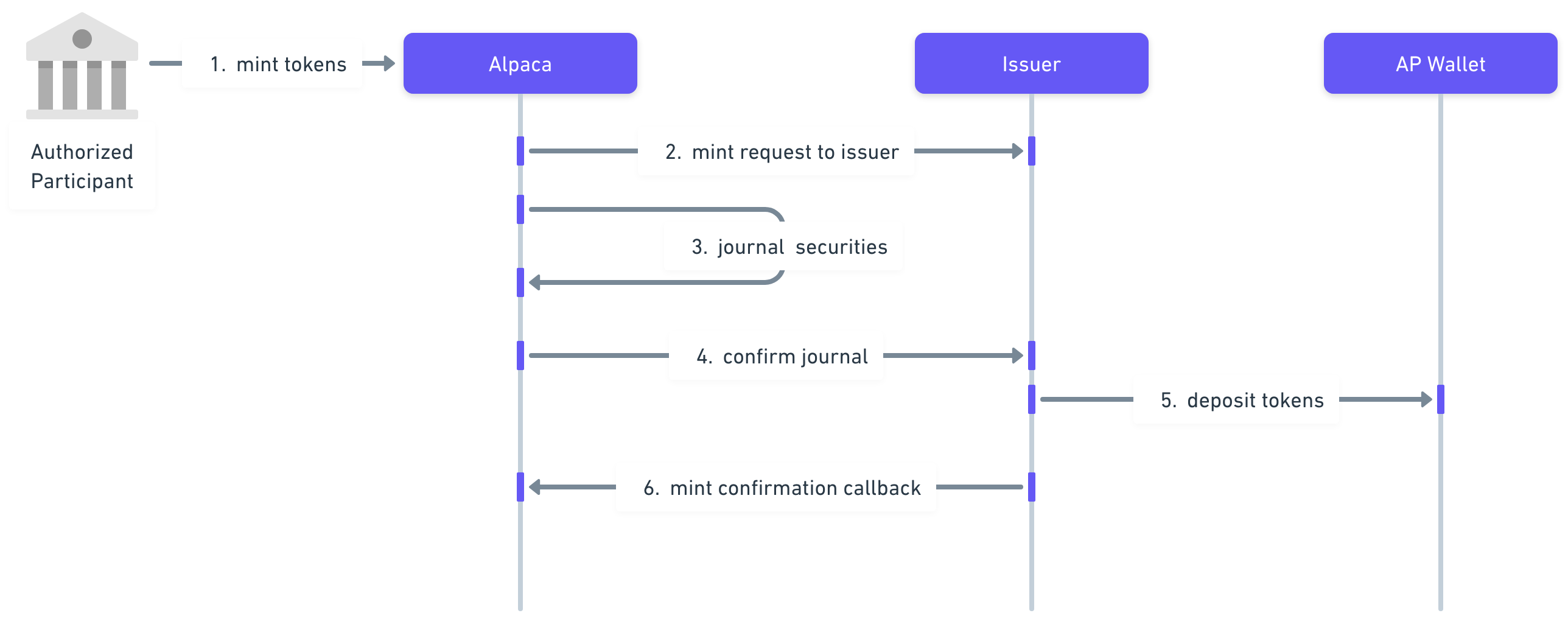
Figure 1. Minting a tokenized asset
Endpoints you need to provide
Issuer’s Mint Request Endpoint
This endpoint will be invoked by Alpaca at step 2.
Expected Request
Endpoint
POST /tokenization/mintBody
{
  "tokenization_request_id": "12345-678-90AB",
  "qty": "1.23",
  "underlying_symbol": "TSLA",
  "token_symbol": "TSLAx",
  "network": "solana",
  "client_external_account_id": "98765432",
  "wallet_address": "<AP's wallet address to deposit the tokenized asset>"
}
AP identifierAlpaca will send exactly one of
client_external_account_idorclient_account_idto identify the Authorized Participant. Which one is used for a given AP/Issuer pair is fixed by agreement between the Issuer and Alpaca (typicallyclient_external_account_idwhen the AP and Issuer are linked via the handshake flow, andclient_account_idwhen the AP's correspondent is authorized by the Issuer directly).
| Field | Description |
|---|---|
| tokenization_request_id | Unique request identifier assigned by Alpaca |
| qty | The underlying quantity to convert into the tokenized asset. The value can be fractional. |
| underlying_symbol | Underlying asset symbol |
| token_symbol | Tokenized asset symbol |
| network | The token’s blockchain network. Currently, we support the following networks:
|
| client_external_account_id | AP’s account identifier on the Issuer's platform, as established during the handshake/account linking flow. Present only if the AP was linked via handshake. Mutually exclusive with client_account_id. |
| client_account_id | AP’s Alpaca account UUID. Present for correspondent-authorized APs instead of client_external_account_id. Mutually exclusive with client_external_account_id. |
| wallet_address | The destination wallet address where the tokenized assets should be deposited |
Expected Response
Body
{
  "issuer_request_id": "123-456-ABCD-7890",
  "status": "created"
}| Field | Description |
|---|---|
| issuer_request_id | Unique identifier assigned by the Issuer |
| status | Tokenization request status. Once the request has been successfully validated, the Issuer will create a mint tokenization request on their platform. This does not mean that the token is created.
|
Status Codes
| Status | Description |
|---|---|
| 200 | OK |
| 400 |
|
Issuer Mint Transfer Confirmation Endpoint
This endpoint will be invoked by Alpaca at step 4.
Expected Request
Endpoint
POST /tokenization/mint/confirmBody
{
  "tokenization_request_id": "12345-678-90AB",
  "issuer_request_id": "ABC-123-DEF-456",
  "client_account_id": "14d484e3-46f9-4e11-99ac-6fee0d4455c7",
  "status": "<completed/rejected>"
}
AP identifierAlpaca echoes back exactly one of
client_account_id(affiliated flow) orclient_external_account_id(handshake flow), matching the identifier Alpaca sent you on the original mint request.
| Field | Description |
|---|---|
| tokenization_request_id | Unique request identifier previously assigned by Alpaca |
| issuer_request_id | Unique identifier assigned by the Issuer as previously received on the mint response |
| client_account_id | AP’s Alpaca account UUID, echoed back from the original mint request. Present on the affiliated (client_account_id) flow; omitted on the handshake (client_external_account_id) flow. |
| client_external_account_id | AP’s account identifier on the Issuer’s platform, echoed back from the original mint request. Present on the handshake flow; omitted on the affiliated flow. Mutually exclusive with client_account_id. |
| client_request_id | Optional AP-supplied correlation identifier. Echoed back on the affiliated (client_account_id) flow only. |
| status | The transfer status. Valid values are:
|
Expected Response
Expected Status Codes
| Status | Description |
|---|---|
| 200 | OK |
This request may be delivered more than onceAlpaca retries the confirmation when it receives a 5xx response, and when the connection fails or times out before a response arrives. Every attempt carries an identical body. A retry can therefore reach you after you have already processed an earlier attempt whose response Alpaca never received.
Treat
tokenization_request_idas an idempotency key: repeated deliveries carrying the sametokenization_request_idmust mint at most once, and must return the same result as the first delivery. A 4xx response is treated as a permanent rejection and is not retried.
Endpoints you need to integrate with
Alpaca's Mint Confirmation Callback Endpoint
This endpoint will be invoked by your platform at step 6. For more details, check full API reference.
Request
Endpoint
POST /v1/accounts/:account_id/tokenization/callback/mintBody
{
  "tokenization_request_id": "12345-678-90AB",
  "client_external_account_id": "5505-1234-ABC-4G45",
  "wallet_address": "<AP's wallet address where the tokenized assets were deposited>",
  "tx_hash": "0x12345678",
  "network": "solana"
}
AP identifierExactly one of
client_external_account_idorclient_account_idmust be provided in the body to identify the Authorized Participant. Which one is used for a given AP/Issuer pair is fixed by agreement between the Issuer and Alpaca (typicallyclient_external_account_idwhen the AP and Issuer are linked via the handshake flow, andclient_account_idwhen the AP's correspondent is authorized by the Issuer directly).
| Field | Description |
|---|---|
| tokenization_request_id | Unique request identifier previously assigned by Alpaca |
| client_external_account_id | AP’s account identifier on the Issuer's platform, as established during the handshake/account linking flow. Mutually exclusive with client_account_id. |
| client_account_id | AP’s Alpaca account UUID, as sent by Alpaca on the validate-mint request for correspondent-authorized APs. Mutually exclusive with client_external_account_id. |
| wallet_address | Wallet address where the tokenized assets were deposited |
| tx_hash | Mint’s transaction hash on the blockchain |
| network | The token’s blockchain network. Currently, we support the following networks:
|
Response
Status Codes
| Status | Description |
|---|---|
| 200 | OK |
| 400 | Internal failure while processing the mint confirmation |
| 401 | Authentication credentials are missing or invalid. |
| 403 | Caller is not authorized to perform this operation. |
| 422 | One or more request parameters are missing or invalid |
Redeem Endpoint and Workflow
The token redeem flow has multiple steps that begin when an AP deposits token into a redemption wallet address that you provide them with. The steps are explained below & depicted in Figure 2 to help you visualize, and all endpoints mentioned are documented below as well.
- The token redemption process will be initiated by an end client by moving tokens into a redemption wallet address provided by you as an Issuer, at which point these tokens should be removed from circulation.
- Your platform should then notify Alpaca that an AP has redeemed their tokens by invoking an endpoint. Your platform should provide their designated Alpaca tokenization account_id as a URL parameter in the endpoint.
- Alpaca will transfer the underlying asset from your Alpaca account as an issuer, into the AP’s Alpaca account.
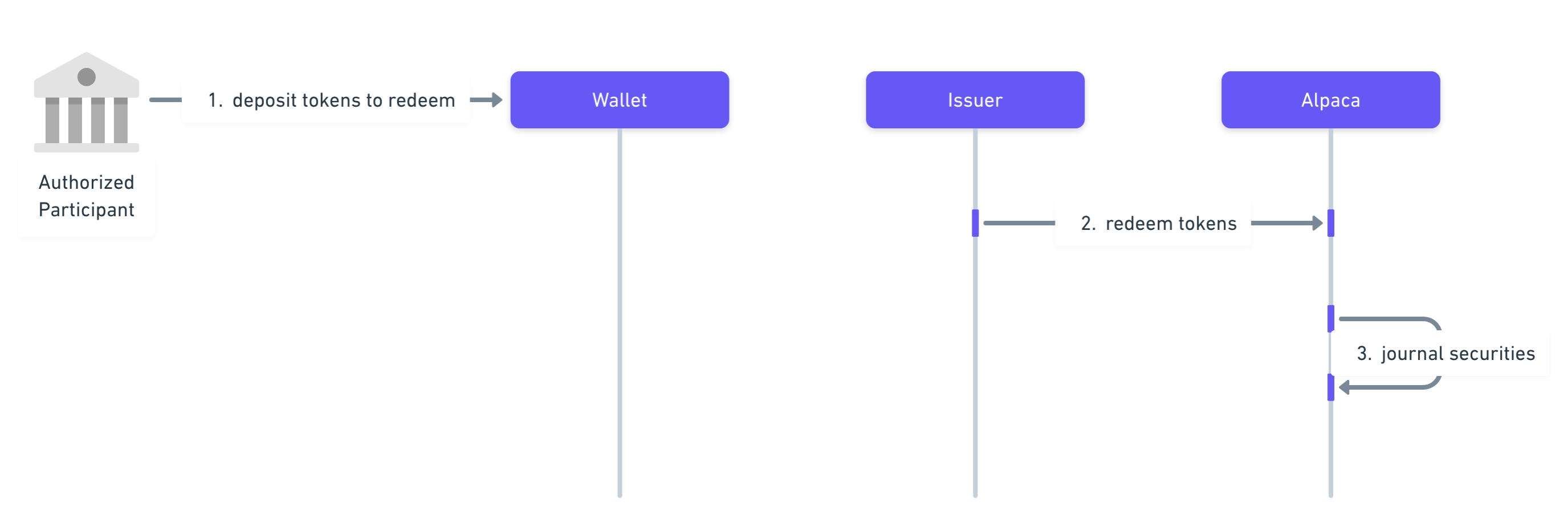
Figure 2. Redeeming a tokenized asset
Endpoint you need to integrate with
Alpaca's Redeem Request Endpoint
This endpoint will be invoked by your platform at step 2. For more details, check full API reference.
Request
Endpoint
POST /v1/accounts/:account_id/tokenization/callback/redeemBody
{
  "issuer_request_id": "ABC-123-DEF-456",
  "underlying_symbol": "AAPL",
  "token_symbol": "AAPLx",
  "client_external_account_id": "5505-1234-ABC-4G45",
  "qty": "1.23",
  "network": "solana",
  "wallet_address": "<the originating wallet address for the redeemed tokens>",
  "tx_hash": "0x12345678"
}
AP identifierExactly one of
client_external_account_idorclient_account_idmust be provided in the body to identify the Authorized Participant. Which one is used for a given AP/Issuer pair is fixed by agreement between the Issuer and Alpaca (typicallyclient_external_account_idwhen the AP and Issuer are linked via the handshake flow, andclient_account_idwhen the AP's correspondent is authorized by the Issuer directly).
| Field | Description |
|---|---|
| issuer_request_id | Unique identifier assigned by the Issuer |
| underlying_symbol | Underlying asset symbol |
| token_symbol | Token asset symbol |
| client_external_account_id | AP’s account identifier on the Issuer's platform, as established during the handshake/account linking flow. Mutually exclusive with client_account_id. |
| client_account_id | AP’s Alpaca account UUID, as sent by Alpaca on the validate-mint request for correspondent-authorized APs. Mutually exclusive with client_external_account_id. |
| qty | The quantity to convert into the underlying asset. The value can be fractional. |
| network | The originating token’s blockchain network. Currently, we support the following networks:
|
| wallet_address | The address where the redeemed tokens were originally held |
| tx_hash | The transaction hash of the tokens being sent to the Issuer's redemption wallet |
Idempotency
Each redeem request must carry a unique issuer_request_id that you assign. Alpaca uses it as the redeem idempotency key: an issuer_request_id may be used only once, so reusing a value Alpaca has already seen is rejected with 422 Unprocessable Entity.
Optional: Idempotency-Key header
For stricter retry-replay semantics you may additionally send an optional Idempotency-Key HTTP header. Whereas reusing an issuer_request_id is rejected with a 422, a matching Idempotency-Key lets Alpaca replay the original response so an automated retry can proceed as if it were the first call:
Idempotency-Key: <your-unique-key>- When present, the value must be between 1 and 128 characters after trimming surrounding whitespace, and contain only printable ASCII characters (no spaces). A malformed key is rejected with
400 Bad Request. - If Alpaca has already processed a request with the same
Idempotency-Keyand an identical body, the original response is replayed instead of creating a new redeem request, and Alpaca sets theIdempotent-Replayed: trueresponse header. A replay of a request that was originallyrejectedis returned with400 Bad Request. - Reusing the same
Idempotency-Keywith a different body is rejected with422 Unprocessable Entity.
Response
Body
{
  "tokenization_request_id": "12345-678-90AB",
  "issuer_request_id": "ABCDEF123",
  "created_at": "2025-09-12T17:28:48.642437-04:00",
  "type": "redeem",
  "status": "pending",
  "underlying_symbol": "TSLA",
  "token_symbol" : "TSLAx",
  "qty" : "123.45",
  "issuer" : "xstocks",
  "network": "solana",
  "wallet_address": "0x1234567A",
  "tx_hash" : "0x1234567A"
}| Field | Description |
|---|---|
| tokenization_request_id | Unique request identifier assigned by Alpaca |
| issuer_request_id | Unique identifier assigned by the Issuer |
| created_at | Timestamp when Alpaca received the redeem request |
| type | Tokenization request type:
|
| status | Current status of the redemption request:
|
| underlying_symbol | The underlying asset symbol |
| token_symbol | The tokenized asset symbol |
| qty | The quantity to convert into the underlying asset. It can be fractional. |
| issuer | The tokenized asset's Issuer. Valid values are:
|
| network | The token's blockchain network. Valid values are:
|
| wallet_address | The originating wallet where the tokenized assets were previously held |
| tx_hash | The transaction hash of the tokens being sent to the Issuer's redemption wallet |
Additional Useful Endpoints
List Tokenization Requests
You can use the following endpoint to list the tokenization requests performed through your platform. You will need to provide your designated Alpaca tokenization account_id as a URL parameter in the endpoint. For more details, check full API reference.
Request
Endpoint
GET /v1/accounts/:account_id/tokenization/requestsResponse
Body
[
   {
    "tokenization_request_id": "12345-678-90AB",
    "issuer_request_id": "ABCDEF123",
    "client_external_account_id": "5505-1234-ABC-4G45",
    "created_at":"2025-09-12T17:28:48.642437-04:00",
    "updated_at":"2025-09-12T17:28:48.642437-04:00",
    "type": "redeem",
    "status": "completed",
    "underlying_symbol": "TSLA",
    "token_symbol" : "TSLAx",
    "qty" : "123.45",
    "issuer" : "xstocks",
    "network": "solana",
    "wallet_address": "0x1234567A",
    "tx_hash" : "0x1234567A",
    "fees" : "0.567"
  },
  {
    "tokenization_request_id": "12345-678-90AB",
    "issuer_request_id": "ABCDEF123",
    "client_external_account_id": "5505-1234-ABC-4G45",
    "created_at":"2025-09-12T17:28:48.642437-04:00",
    "updated_at":"2025-09-12T17:28:48.642437-04:00",
    "type": "redeem",
    "status": "completed",
    "underlying_symbol": "TSLA",
    "token_symbol" : "TSLAx",
    "qty" : "123.45",
    "issuer" : "xstocks",
    "network": "solana",
    "wallet_address": "0x1234567A",
    "tx_hash" : "0x1234567A",
    "fees" : "0.567"
  },
  {
    "tokenization_request_id": "12345-678-90AB",
    "issuer_request_id": "ABCDEF123",
    "client_external_account_id": "5505-1234-ABC-4G45",
    "created_at":"2025-09-12T17:28:48.642437-04:00",
    "updated_at":"2025-09-12T17:28:48.642437-04:00",
    "type": "redeem",
    "status": "completed",
    "underlying_symbol": "TSLA",
    "token_symbol" : "TSLAx",
    "qty" : "123.45",
    "issuer" : "xstocks",
    "network": "solana",
    "wallet_address": "0x1234567A",
    "tx_hash" : "0x1234567A",
    "fees" : "0.567"
  }
]| Field | Description |
|---|---|
| tokenization_request_id | Unique request identifier assigned by Alpaca |
| issuer_request_id | Unique identifier assigned by the Issuer |
| client_external_account_id | AP’s account identifier on the Issuer’s platform (handshake flow). Present on non-affiliated requests. |
| client_account_id | AP’s Alpaca account UUID (affiliated flow). Present on affiliated requests instead of client_external_account_id. |
| created_at | Timestamp when the request was created |
| updated_at | Timestamp when the request was last updated |
| type | Tokenization request type. Valid values are:
|
| status | Current status of the tokenization request:
|
| underlying_symbol | The underlying asset symbol |
| token_symbol | The token asset symbol |
| qty | The quantity for this request |
| issuer | The tokenized asset's Issuer. Valid values are:
|
| network | The token's blockchain's network. Valid values are:
|
| wallet_address | The wallet address associated with this request |
| tx_hash | The transaction hash on the blockchain |
| fees | The fees charged for this tokenization request |
Get a Tokenization Request by ID
Fetch a single tokenization request by the Alpaca-assigned tokenization_request_id. Returns the same object as a single entry in the List Tokenization Requests response.
Request
Endpoint
GET /v1/accounts/:account_id/tokenization/requests/:tokenization_request_id| Field | Description |
|---|---|
| account_id | Your Alpaca tokenization account_id. |
| tokenization_request_id | The Alpaca-assigned identifier of the request to fetch. |
Status Codes
| Status | Description |
|---|---|
| 200 | OK |
| 401 | Authentication credentials are missing or invalid. |
| 404 | No tokenization request with that id exists for your account. |
| 422 | Invalid Parameters - tokenization_request_id is not a valid UUID. |
Get a Tokenization Request by Issuer Request ID
Fetch a single tokenization request by the issuer_request_id you assigned when submitting a redeem request. Returns the same object as a single entry in the List Tokenization Requests response.
Request
Endpoint
GET /v1/accounts/:account_id/tokenization/requests:by_issuer_request_id?issuer_request_id=<your-value>| Field | Description |
|---|---|
| account_id | Your Alpaca tokenization account_id. |
| issuer_request_id | The identifier you assigned to the redeem request, passed as a query parameter. |
Status Codes
| Status | Description |
|---|---|
| 200 | OK |
| 401 | Authentication credentials are missing or invalid. |
| 404 | No tokenization request with that issuer_request_id exists for your account. |
| 422 | Invalid Parameters - the issuer_request_id query parameter is missing. |
Glossary
- Authorized Participant: An entity licensed to conduct digital asset business in the tokenized asset, e.g xstocks. The Issuer only sells tokenized assets to Authorized Participants (AP). The AP can sell the tokenized assets to their clients.
- Issuer: Financial entity which purchases the underlying equity securities, wraps them and creates/issues tokens which are backed by the same.
- Mint: The act of converting underlying equity securities into tokenized assets.
- Redeem: The act of converting tokenized assets into their underlying equity securities.
Alpaca's Instant Tokenization Network is owned and developed by AlpacaDB, Inc. and Alpaca Crypto LLC. Additional geographic restrictions may apply for tokenization services based on local regulatory requirements. Neither Alpaca Crypto LLC nor Alpaca Securities LLC are the issuer of, nor directly involved in, the tokenization of any assets. Tokenization is performed by a third party. Tokenized assets do not represent direct equity ownership in any underlying company or issuer. Instead, tokenized assets generally provide economic exposure to the equity securities of an underlying issuer. As such, holders of tokenized assets have no voting rights, dividend entitlements, or legal claims to the underlying company shares or any residual assets in the event of the underlying company’s liquidation or insolvency, unless explicitly stated otherwise. All investments involve risk. For more information, please see our Tokenization Risk Disclosure.
Updated 29 days ago