
Tokenization Guide for Authorized Participant
The Instant Tokenization Network (ITN) is a platform designed to streamline and accelerate the process of in-kind creation and redemption of tokenized assets. The goal of the ITN is to enable efficient, secure, and rapid conversion of real-world and digital assets to and from various tokens issued by partners on the network. The network acts as instant settlement rails for market participants to programmatically rebalance inventory thereby stitching together fragmented tokenized asset liquidity across the industry. This document will guide the Authorized Participant on how to start using Alpaca’s Instant Tokenization Network.
Overview
Before you can start integrating into Alpaca's ITN (Instant Tokenization Network) as an authorized participant, there are multiple steps that you need to ensure you have completed:
- Sign up as an authorized participant with the issuer(s) directly so that you are allowed to mint and redeem their tokens.
- Integrate into Alpaca's Broker API or Trading API offering to buy and sell stocks on an account in your name at Alpaca. This would allow Alpaca to move stocks to/from your account during the token mint and redeem flows.
Once you have completed the above, this document will guide you to integrate into ITN as an AP. You will need to:
- Provide Alpaca's integration team with the email address you used when signing up with the issuer(s) as an AP & the Alpaca account number that you expect stock to be moved to/from.
- Alpaca integration team will need to perform a handshake process with the issuer to link your Alpaca account to your Issuer account.
- Integrate with 1 Alpaca endpoint that you will utilize to complete token minting flow.
Mint Endpoint and Workflow
The token minting flow has multiple steps that begin when you, as an AP, request token minting from Alpaca. The steps are explained below & depicted in Figure 1 to help you visualize. Any referenced endpoints are also documented below.
- Once the handshake process mentioned earlier is completed, you will be able to request minting of tokenized assets using Alpaca's mint request endpoint.
- The mint request is validated by both Alpaca and the Issuer.
- Alpaca will validate that you:
- Are an AP authorized for tokenizations.
- Have enough underlying position to mint on your registered Alpaca account.
- The Issuer will validate that:
- The wallet address you provided is registered to the AP.
- The requested token is available on the requested network.
- Alpaca will validate that you:
- Upon successful validation of the mint request, Alpaca journals the requested quantity of the underlying security from the your Alpaca account into the Issuer's Alpaca account.
- Alpaca confirms with the Issuer that the underling security has been journaled to their account.
- The issuer then deposits the tokenized assets in the wallet address you've provided on the mint request.
- Finally, the Issuer informs Alpaca of the successful deposit of tokens in the AP’s wallet address.
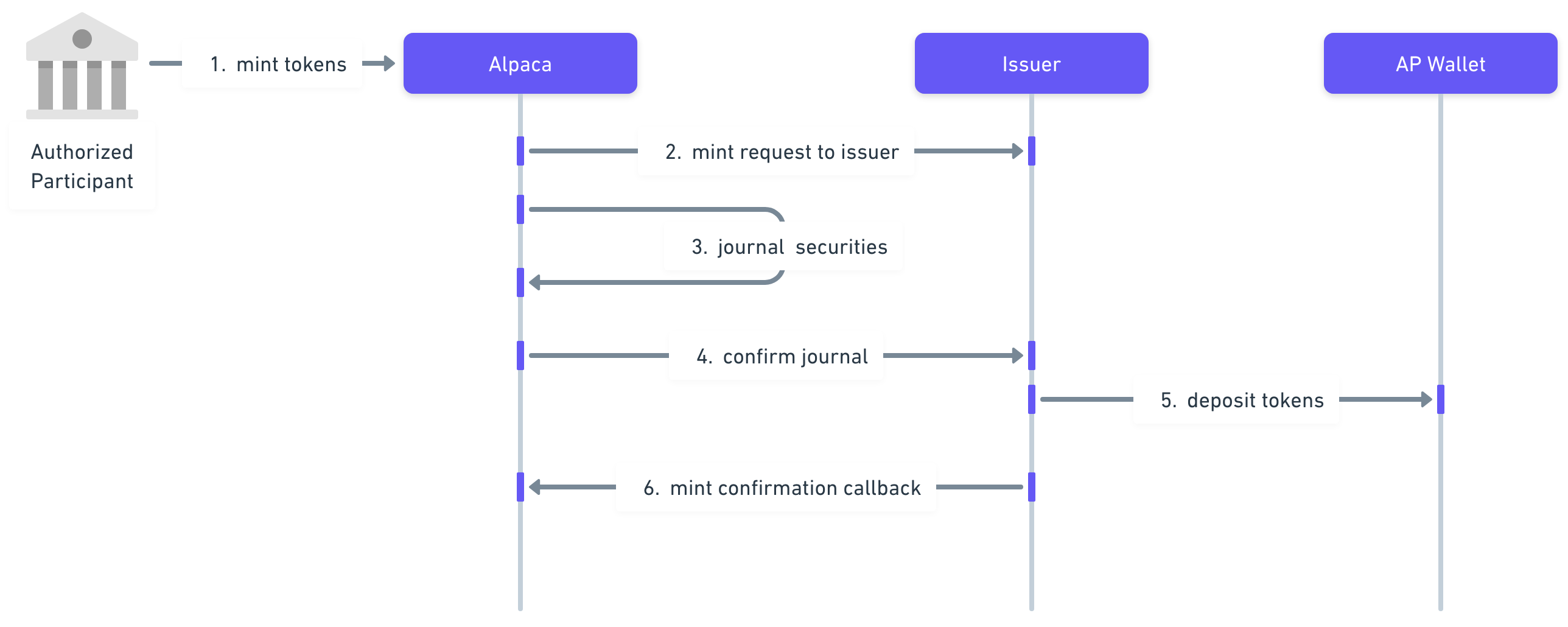
Figure 1. Minting a tokenized asset
Alpaca's Mint Request
Endpoint
POST /v1/accounts/:account_id/tokenization/mint| Field | Description |
|---|---|
| account_id | Your Alpaca account_id that Alpaca linked to your AP account at the issuer. |
Body
{
  "underlying_symbol": "AAPL",
  "qty": "1.23",
  "issuer": "xstocks",
  "network": "solana",
  "wallet_address": "0x1234567A"
}
Field | Description |
|---|---|
underlying_symbol | Underlying asset symbol |
qty | The underlying quantity to convert into the tokenized asset. The value can be fractional. |
issuer | The tokenized asset's Issuer. Valid values are:
|
network | The token's blockchain's network. Valid values are:
|
wallet_address | The destination wallet address where the tokenized assets should be deposited. Important Note: You will need to check with the issuer whether this wallet address has to be whitelisted on their platform, and if so you will need to whitelist the address before you can use it as part of a mint request. |
Response
Body
{
  "id": "14d484e3-46f9-4e11-99ac-6fee0d4455c7",
  "created_at":"2025-09-12T17:28:48.642437-04:00",
  "type": "mint",
  "status": "pending",
  "underlying_symbol": "AAPL",
  "token_symbol": "AAPLx",
  "qty": "3",
  "issuer": "xstocks",
  "network": "solana",
  "wallet_address": "0x1234567A",
  "fees" : "0.567"
}
Field | Description |
|---|---|
id | Unique request identifier assigned by Alpaca |
created_at | Timestamp when Alpaca received the mint request |
type | Tokenization request type:
|
status | Current status of the mint request:
|
underlying_symbol | The underlying asset symbol |
token_symbol | The tokenized asset symbol |
qty | The underlying quantity to convert into the tokenized asset. It can be fractional. |
issuer | The tokenized asset's issuer. Valid values are:
|
network | The token's blockchain network. Valid values are:
|
wallet_address | The wallet address to receive the tokenized assets |
fees | Fees charged for this tokenization request |
Status Codes
| Status | Description |
|---|---|
| 200 | OK - Mint request created successfully |
| 403 | Forbidden - Insufficient position quantity, unsupported account etc. |
| 422 | Invalid Parameters - One or more parameters provided are invalid. |
Redeem Workflow
The token redeem flow has multiple steps that begin when you, as an AP, deposit tokens to an issuer's redemption wallet address. The steps are explained below & depicted in Figure 2 to help you visualize.
- The token redemption process will be initiated by the AP by moving their tokens into the Issuer’s redemption wallet address. The Issuer will remove these tokens from circulation.
- The Issuer will then notify Alpaca that an AP has redeemed their tokens. The issuer will provide multiple fields to Alpaca as documented here.
- Finally, Alpaca will journal the underlying asset from the Issuer’s Alpaca account into the AP’s Alpaca account.
Figure 2 depicts the full tokenized asset redemption workflow.
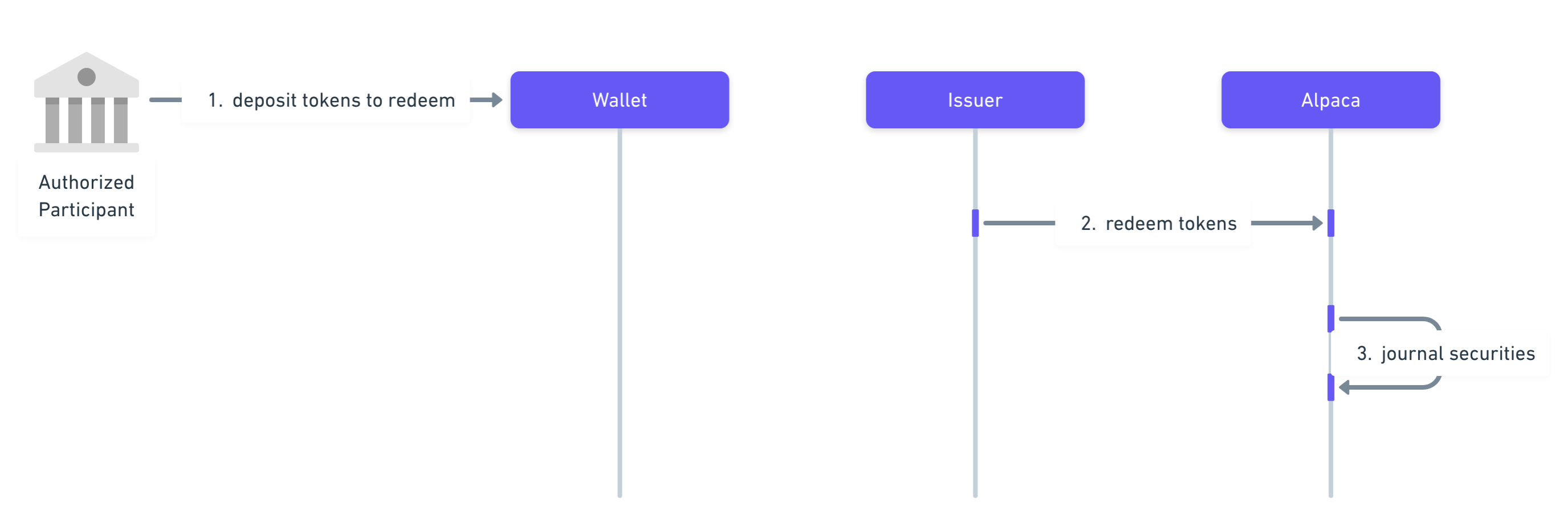
Figure 2. Redeeming a tokenized asset
Additional Useful Endpoints
List Tokenization Requests
You can use the following endpoint to list the tokenization requests performed on the Instant Tokenization Network platform.
Request
Endpoint
GET /v1/accounts/:account_id/tokenization/requestsResponse
Body
[
   {
    "id": "12345-678-90AB",
    "issuer_request_id": "ABCDEF123",
    "created_at":"2025-09-12T17:28:48.642437-04:00",
    "updated_at":"2025-09-12T17:28:48.642437-04:00",
    "type": "redeem",
    "status": "completed",
    "underlying_symbol": "TSLA",
    "token_symbol" : "TSLAx",
    "qty" : "123.45",
    "issuer" : "xstocks",
    "network": "solana",
    "wallet_address": "0x1234567A",
    "tx_hash" : "0x1234567A",
    "fees" : "0.567"
  },
  {
    "id": "12345-678-90AB",
    "issuer_request_id": "ABCDEF123",
    "created_at":"2025-09-12T17:28:48.642437-04:00",
    "updated_at":"2025-09-12T17:28:48.642437-04:00",
    "type": "redeem",
    "status": "completed",
    "underlying_symbol": "TSLA",
    "token_symbol" : "TSLAx",
    "qty" : "123.45",
    "issuer" : "xstocks",
    "network": "solana",
    "wallet_address": "0x1234567A",
    "tx_hash" : "0x1234567A",
    "fees" : "0.567"
  },
  {
    "id": "12345-678-90AB",
    "issuer_request_id": "ABCDEF123",
    "created_at":"2025-09-12T17:28:48.642437-04:00",
    "updated_at":"2025-09-12T17:28:48.642437-04:00",
    "type": "redeem",
    "status": "completed",
    "underlying_symbol": "TSLA",
    "token_symbol" : "TSLAx",
    "qty" : "123.45",
    "issuer" : "xstocks",
    "network": "solana",
    "wallet_address": "0x1234567A",
    "tx_hash" : "0x1234567A",
    "fees" : "0.567"
  }
]
Field | Description |
|---|---|
id | Unique request identifier assigned by Alpaca |
issuer_request_id | Unique identifier assigned by the Issuer |
created_at | Timestamp when the request was created |
updated_at | Timestamp when the request was last updated |
type | Tokenization request type. Valid values are:
|
status | Current status of the tokenization request:
|
underlying_symbol | The underlying asset symbol |
token_symbol | The token asset symbol |
qty | The quantity for this request |
issuer | The tokenized asset's Issuer. Valid values are:
|
network | The token's blockchain's network. Valid values are:
|
wallet_address | The wallet address associated with this request |
tx_hash | The transaction hash on the blockchain |
fees | The fees charged for this tokenization request |
Glossary
- Authorized Participant: An entity licensed to conduct digital asset business in the tokenized asset, e.g xstocks. The Issuer only sells tokenized assets to Authorized Participants (AP). The AP can sell the tokenized assets to their clients.
- Issuer: Financial entity which purchases the underlying equity securities, wraps them and creates/issues tokens which are backed by the same.
- Mint: The act of converting underlying equity securities into tokenized assets.
- Redeem: The act of converting tokenized assets into their underlying equity securities.
Alpaca's Instant Tokenization Network is owned and developed by AlpacaDB, Inc. and Alpaca Crypto LLC. Additional geographic restrictions may apply for tokenization services based on local regulatory requirements. Neither Alpaca Crypto LLC nor Alpaca Securities LLC are the issuer of, nor directly involved in, the tokenization of any assets. Tokenization is performed by a third party. Tokenized assets do not represent direct equity ownership in any underlying company or issuer. Instead, tokenized assets generally provide economic exposure to the equity securities of an underlying issuer. As such, holders of tokenized assets have no voting rights, dividend entitlements, or legal claims to the underlying company shares or any residual assets in the event of the underlying company’s liquidation or insolvency, unless explicitly stated otherwise. All investments involve risk. For more information, please see our Tokenization Risk Disclosure.
Updated 3 months ago